6 AI Tools for Teachers Who Love Class Discussion
If your favorite moments happen in the swirl of open debate, hard questions, and student-driven conversation, you know the struggle: School is built for coverage, pacing, and testable outcomes—but genuine discussion is messy, slow, and sometimes off-script. For years, I tried to harness that energy with Socratic seminars, fishbowls, and roleplays—only to run out of time, miss quieter voices, or lose track of all the sticky notes stuck everywhere after a heated seminar.
This year, I made it my mission to find AI tools that amplify real dialogue—that help me spark, document, and deepen student talk (without turning it into a worksheet factory or killing the vibe). These aren’t "top 10" apps everyone knows. They're my go-to helpers for teachers who value talk as much as tests—who want to see every student speak, challenge, and reflect out loud. And yes:
Try Kuraplan
shows up, but it isn’t the only backbone you’ll need for a lively discussion classroom.
1. People AI – Unscripted Interviews, Arguments, and Panels
You know the classic move: “Imagine you could talk to Dickens about industrial England, or ask a modern activist about their tactics.” But most panel days stall when kids run out of nerve—or the expert guest is just you doing a falsetto voice. With People AI, I let students run live Q&As with any figure—real, literary, even invented. It adapts to their line of questioning, throws curveballs back, and—even better—lets you stage multi-character panels (Freud vs. Freud, anyone?). We’ve grilled authors, world leaders, and, yes, TikTok historians on their best hot takes. For introverts, it’s also a safe step into the fray: you can start in text chat or prep together in small groups. The magic? Even when I have nothing planned, students keep the conversation rolling, and the whole class leaves with a sense of ownership over what got discussed.
Try People AI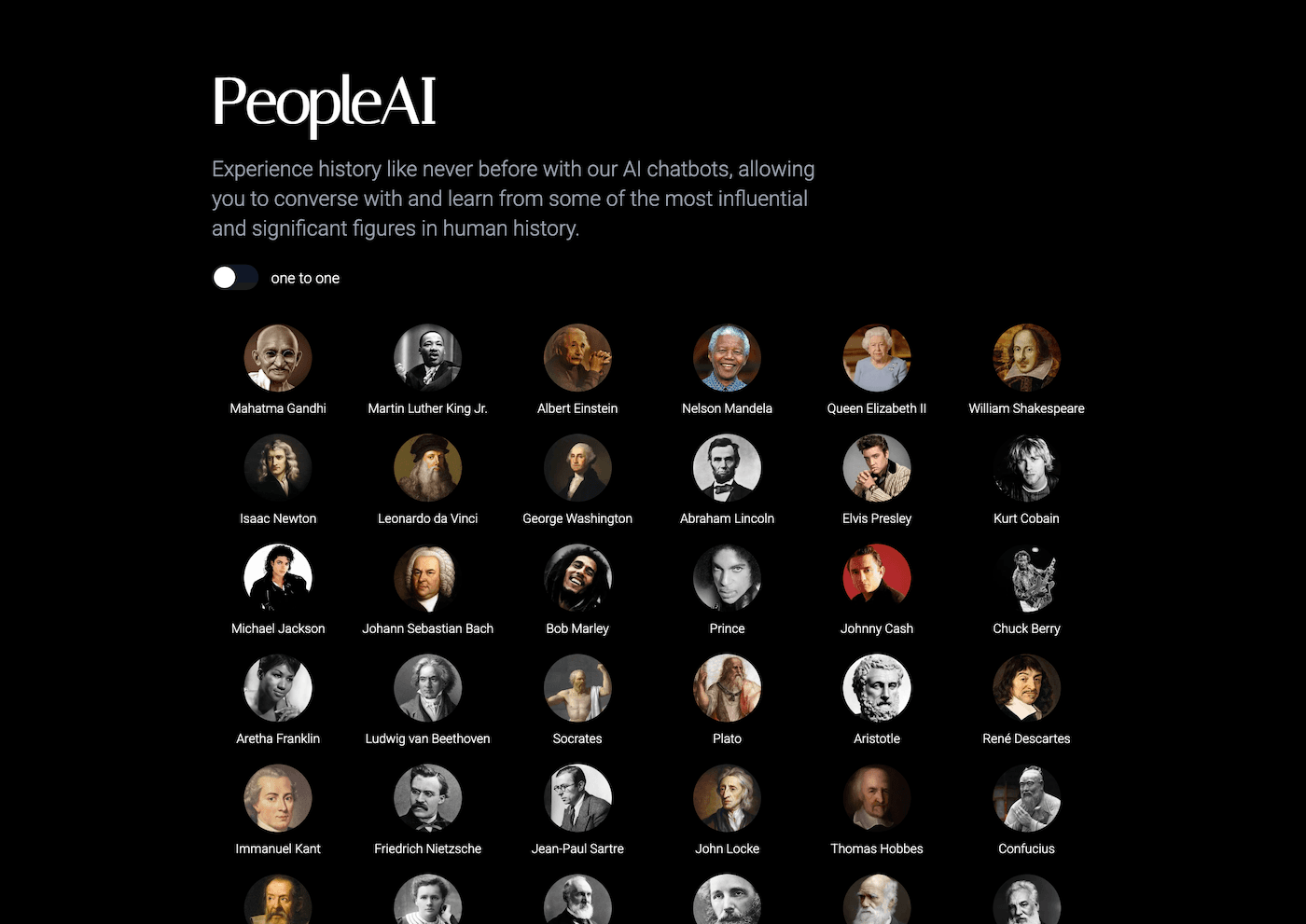
2. Notebook LM – Capturing the Conversation (and What Got Left Behind)
Ever finish a discussion and think, “Did anyone remember the best question we didn’t get to?” I toss every exit ticket, shared doc, and group reflection into Notebook LM—then ask the AI to pull out themes, lingering debates, or new questions. My workflow: after every major seminar, students record their takeaways as voice notes or paragraphs. Notebook LM clusters those into possible podcasts, roundtable scripts, or even series of "unanswered questions." The next class starts with those prompts—sometimes turning a throwaway exit slip into a week-long inquiry. Bonus: Students actually hear their voices and see their impact on the course arc, not just a grade at the end of class.
Try Notebook LM
3. Kuraplan – Loose Structures for an Unfolding Dialogue
Most planners ask, “What will you teach?”. Kuraplan is the rare AI tool that helps you plan how students talk. I load it with my big discussion goals ("Construct an argument about justice in Antigone," "Debate the ethics of AI"), the group’s preferred formats (debate, inside-outside circle, newsroom panels), and reflection checkpoints—not just quizzes. The best move? Share Kuraplan's outline with students, let them re-order discussion days, propose new starter prompts, and insert peer feedback loops. Suddenly, our sequence is a living contract of how we want to talk and listen, not just what to cover. Kuraplan isn’t just a pacekeeper; it’s a co-designer for real, responsive group talk.
Try Kuraplan4. Gamma – Making Talk Visible (so Every Voice Counts)
Whiteboard clouds and sticky note swaps are great…until the bell rings. Now, my groups use Gamma to dump everything—argument maps, chat logs, even memes made during heated exchanges—into shared storyboards. Gamma’s AI builds a visual "debate storyboard," where every claim, counterclaim, and supporting fact gets its own node, timeline, or slide, all drag-and-droppable for class review. On Fridays, we replay our discussions, spotlight quiet but key points, and create digital exhibit boards to share at parent nights or advisory showcase. Suddenly, talk feels like a product, not just a process—and every kid sees their input in a living document.
Try Gamma
5. Jungle – Flashcard Debates, Real & Playful
Classic flashcards drill vocab. Jungle lets students author their own controversial questions, misunderstood concepts from the week’s talk, or even group “stumpers." I have students swap decks, annotate each other’s logic, and remix the hardest cards into “hot seat” game days ("Defend or Flip!"). The AI checks for redundancy and laddering complexity—so debates build, rather than spiral. The bonus? Struggling students get to ask what confuses them most, while savvy debaters get to throw curveballs at the teacher (who, yes, plays too). The result: talk about talk, real feedback, and less pressure to "get it right" at every turn.
Try Jungle
6. Suno AI – Rituals, Rants, and Collective Reflective Noises
Real dialogue means ritual—openers, cool-downs, and in my class, rants set to music. After every major seminar, I let students write a Suno prompt (“Anthem for the Debate We Survived,” “Ballad for Arguments Lost,” or “Monday Momentum Song”). Suno instantly generates tracks we use as transitions, celebrations, or to diffuse hard moments. My favorite? One group built a "Raise Your Hand Refrain" they sang during awkward silences until someone chimed in. The best music becomes the echo; even the introverts hum our routines. If you want to mark class identity, memory, and pride, let students soundtrack their own talk.
Try Suno AI
Real-World Advice for Teachers Who Build Community With Talk
- Use AI to amplify—not script—student debate. The best workflows let the group take the reins.
- Make EVERY stage visible—from pre-talk planning (Kuraplan), to in-progress maps (Gamma), to post-debate syntheses (Notebook LM or Suno).
- Focus on reflection as much as argument: collect, remix, and revisit questions long after the bell.
- Let students drive tool use: peer-authored flashcards, personalized music rituals, and editable debate maps build trust and buy-in.
If you’ve built a discussion-driven class and found the AI trick (or wild new workflow) that lifted a whole group—share it below! The best ideas in 2025 will come from talk, not just tasks.